- Aug 15, 2025
[Social Media] 2025 August - Instagram Update: Reposts
- Sugar Cookie Marketing Group
- Social Media
- 0 comments
It’s not another day in business without a social media update to throw us off and make us learn something new on our baking business journey. This time, it’s Instagram’s pretty big announcement of Reposts. Before we dive into how you can use reposts to up your bakery business strategy, let’s cover what reposts actually are.
What are Instagram Reposts
Similar to a “re-tweet” (what Twitter used to refer to someone who reshared someone’s tweet on their own profile before it was renamed “X”), Reposts are resharing someone’s content on your Instagram or TikTok accounts.
Reposts are nothing new to social media and have been around for a looong time on TikTok, who first coined the term. It’s crazy to think that TikTok rolled the feature out back in 2022 and Instagram is just now rolling it out in 2025 makin’ the apps look ever more similar in nature. With the ever-looming TikTok ban (or is it still looming!?) - it makes sense that Instagram is picking its favorite features to snag from its competitor.
So, what is a Repost? On Instagram, if you resonated with someone’s posts before, you had the option to share them to your stories, which vanished after 24 hours. This gave content creators fairly limited options to show their audience what content meant the most to them.
Reposts allow you to reshare content from other accounts, and it now has its own home right on your profile under the Reposts Tab, and it’ll never expire as long as the original creator doesn’t delete the original content.
Now that we know what Reposts are, let’s talk about some of the strategies behind them, especially when it comes to your small home bakery.
How to Repost on Instagram
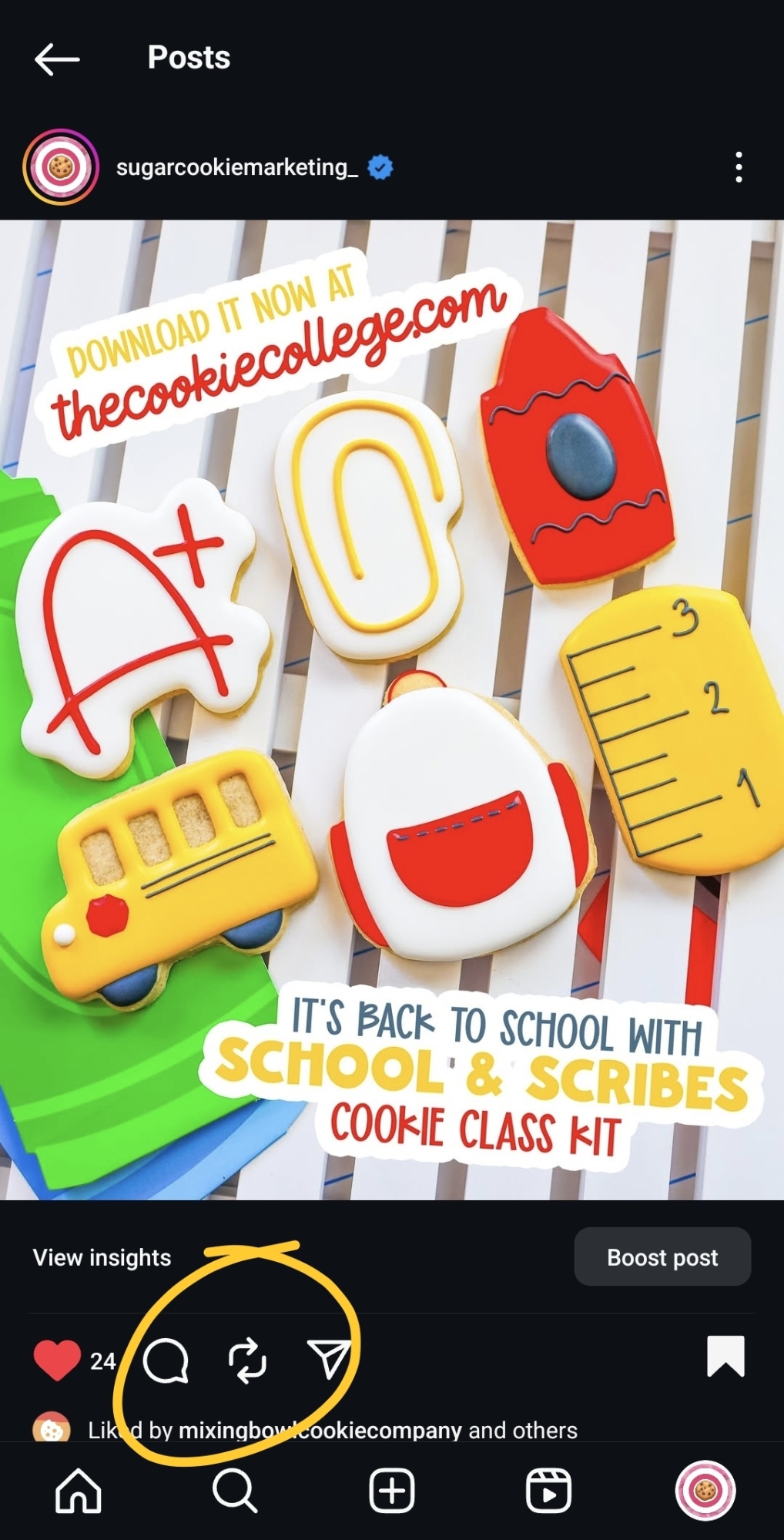
You might have noticed two new arrows forming a circle under every post in your feed recently, and that is the Repost button. With just a click, you can now reshare content to your followers without trying to mess with Stories or havin’ to download a weird app.
Each post will allow you the option to reshare, so no matter if it’s a standalone photo post, a carousel, or a Reel - you can now make that Reel go extra far by sharing it to your own audience.
To find what you have Reposted, you can go to the Repost Tab on your main Instagram Profile. It’ll sit right about your Highlights and right in between your Reels and Mentions tabs.
If you’re curious if something in your feed is a Repost, look for the purple icon next to the Profile Photo of the Account, as that will mean it has been reposted from that account.
You can always delete your Reposts by going to your Reposts Tab and clicking the content, and then clicking the three dots at the bottom right-hand side and then clicking Delete.
How to use Reposts in your bakery business
Unlike Stories, which vanish after 24 hours, Reposts might want a little more strategy since they will forever stay on your profile (well, at least until you either delete them or the original creator deletes them).
Reposts are a “you scratch my back and I’ll scratch yours” type of deal because you are letting the original post get further reach by sharing it to your audience (how nice of you), aaaand you’re getting more engagement by featuring this content on your profile (how nice of them).
The content you want to Repost needs to fall in line with your content strategy. Are you a home baker looking to make more local connections in your community? You’re going to want to stay away from baker drama and post content that your local audience will want to see. Remember, these Reposts will live on your Instagram profile, so you want to make sure a future customer isn’t turned off by the content you reshare.
✅ Here’s an example of how to use Reposts for your small bakery business: You’re a small, home baker lookin’ to teach your first cookie decorating class in your neighborhood. Content you might want to Repost is the new coffee shop’s opening day, so you can start putting feelers out for your next cookie class venue.
🚫 Here’s an example of how not to use Reposts for your small bakery business: A baker halfway across the globe gets into a disagreement with their client and openly bashes them on their profile. You have thoughts on who is right and who is wrong, and repost it to see what other bakers might think.
You are a small business owner, and the content you align with needs to be content that benefits your business in the long run.
As you grow your business and your attention aligns elsewhere, you’ll want to revisit your Reposts and make sure that the content you reshared from years ago still aligns with your business now. You may have forgotten about it, but it doesn’t mean your future clients aren’t looking at it.
Reposts will end up in the Feeds of your Followers as well as in the Repost Tab on your Instagram Profile. Makin’ sure that what you are reposting is going to help you get more business vs. cost you some, which is going to be something you need to think about before hitting that button.
Reposts have been used to cause drama in the past, so don’t think that because you didn’t create the original content that you won’t be held to its standard.
Reposts are a silent way to stand behind someone else’s content in a public way. Remember, your Reposts aren’t private and can be accessed by anyone when you have a public profile.
Make a comment that is a little left of center on some random person’s post thinkin’ it would never be seen? They might just make you the center of their next 5 videos, and what they can use against you is your Reposts. It happens daily on TikTok, so we’d be remiss not to think it will happen on Instagram as well. Your Reposts are a reflection of you. If you reshare something, it obviously resonates with you and, in turn, is something you care about. Make sure your Reposts are in line with your business goals.
You can delete Reposts at any time, but people screen record like it’s a full-time hobby, so just because it’s gone now from you deleting it doesn’t mean it doesn’t exist on other people’s phones.
🎓 Hey - thanks for reading! Want more from the Cookie College blog? 🖱️ Click here!
(Pssst - if you'd like to learn how to up your bakery business in marketing and lead generation - check out one of our sugar cookie marketing memberships. 🖱️ You can learn more about those here.)
check out our five
🖐️ Marketing Memberships
The Cookie College is a collection of five different memberships developed to help you increase your bottom line as you make more 🤑 dough while makin' that 🍪 dough. Click on a membership to sign up - cancel anytime!
- $76/mo or $760/yr
The Cookie College
- $63/mo or $630/yr
The Cookie Class Kits
- $36/mo
The Bakers Biz Basics
- $10/mo or $100/yr
The Digital Downloads
- $2/mo